Interview Questions
This chapter answers to the following questions:
- What is the difference between containers and VMs?
- What is the containerization process?
- Can We Containerize the Linux Kernel?
What is the difference between containers and VMs?
The core difference lies in what they virtualize.
- Virtual Machines (VMs) virtualize the hardware. Each VM acts like a complete physical computer with its own full operating system.
- Containers virtualize the Operating System. They sit on top of a physical server and its host OS, sharing the OS kernel while keeping applications isolated.
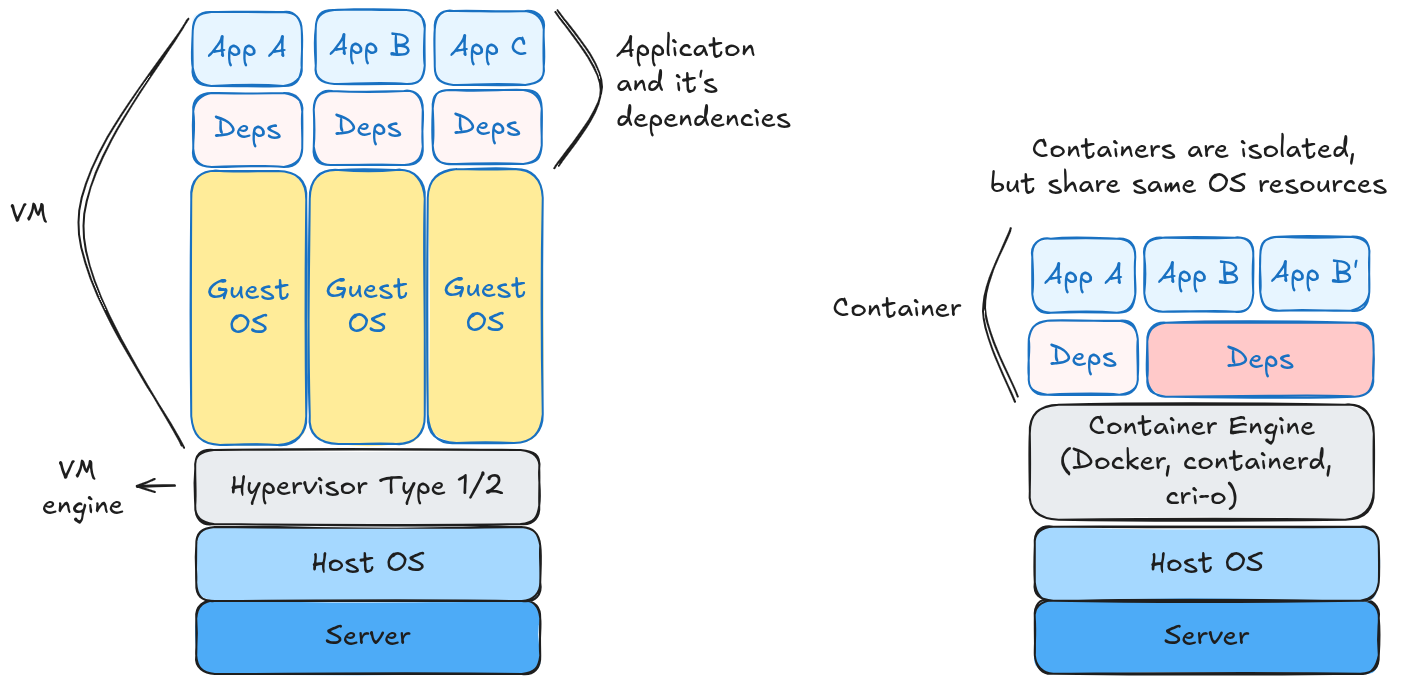
This architectural difference dictates every other distinction, from speed to size to security.
Architectural Comparison
| Feature | Virtual Machines (VMs) | Containers |
|---|---|---|
| Virtualization Level | Hardware Level (via Hypervisor) | OS Level (via Container Engine) |
| Operating System | Each VM has its own full Guest OS. | All containers share the Host OS Kernel. |
| Size | Heavyweight (GBs). Includes a full OS, libraries, and app. | Lightweight (MBs). Includes only app & dependencies. |
| Startup Time | Slow (Minutes). Must boot up a full OS. | Fast (Milliseconds/Seconds). Process starts immediately. |
| Isolation | Strong. Complete isolation; one VM cannot easily access another. | Moderate. Process-level isolation; they share the kernel. |
Virtual Machines
A virtual machine (VM) is a fully self-contained computing environment that operates independently from its host system and other VMs.
Advantages:
- Strong Isolation: VMs provide robust security boundaries. In the event of a malware infection, propagation to the host system or adjacent VMs is significantly restricted.
- Operating System Flexibility: Multiple operating systems — including Windows, Linux, and macOS — can run concurrently on a single physical server.
Disadvantages:
- Resource Overhead: Each VM requires a dedicated OS kernel along with its own allocated memory and processing capacity. In a deployment of ten VMs, these resources are consumed by the operating systems themselves before any application workloads are executed.
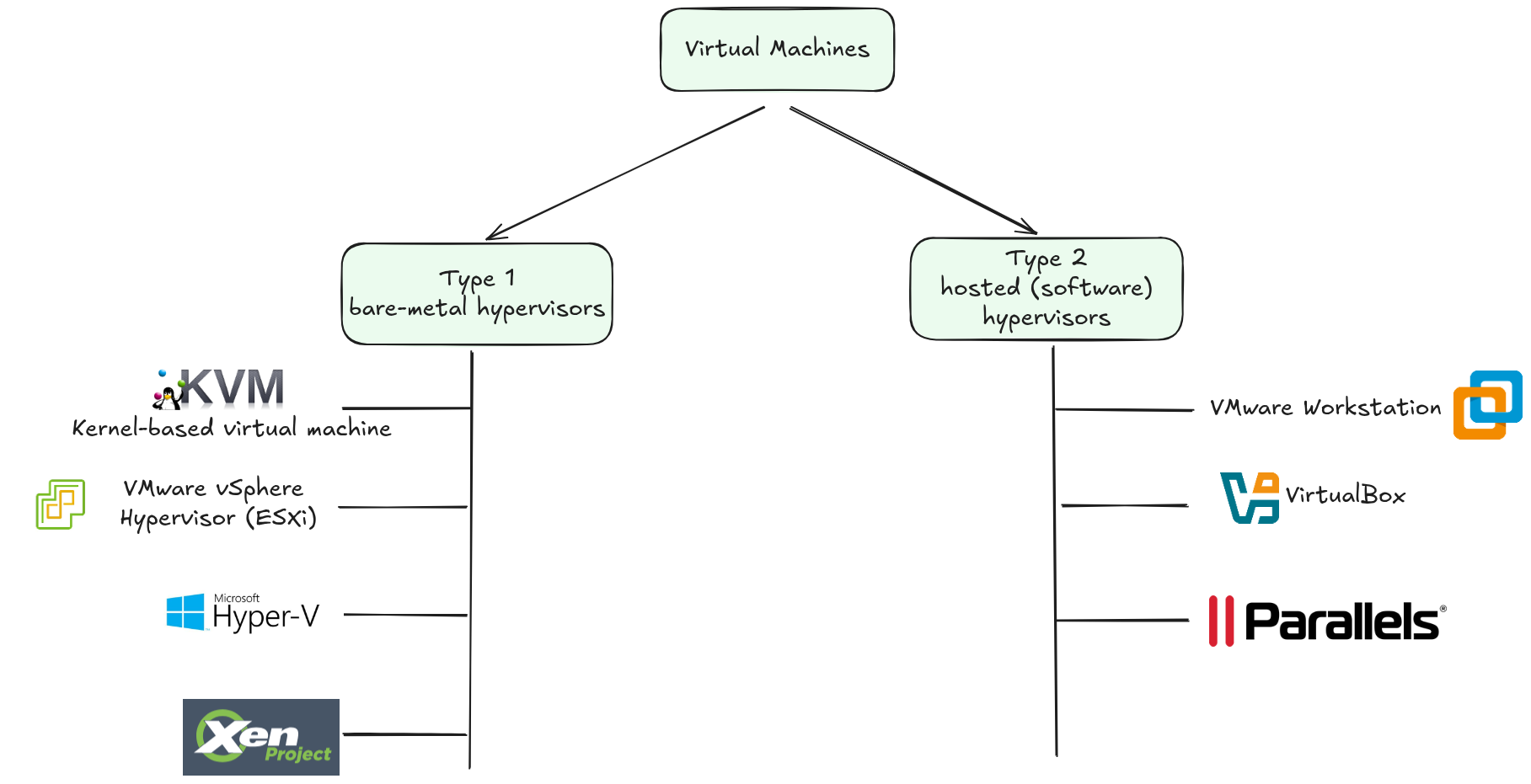
Hypervisor is used to create VMs and achieve isolation. It abstracts the underlying physical resources, such as processors, memory and devices, and allows multiple VMs (guests) to run simultaneously on a single physical machine (the host) while ensuring full resource separation.
Containers
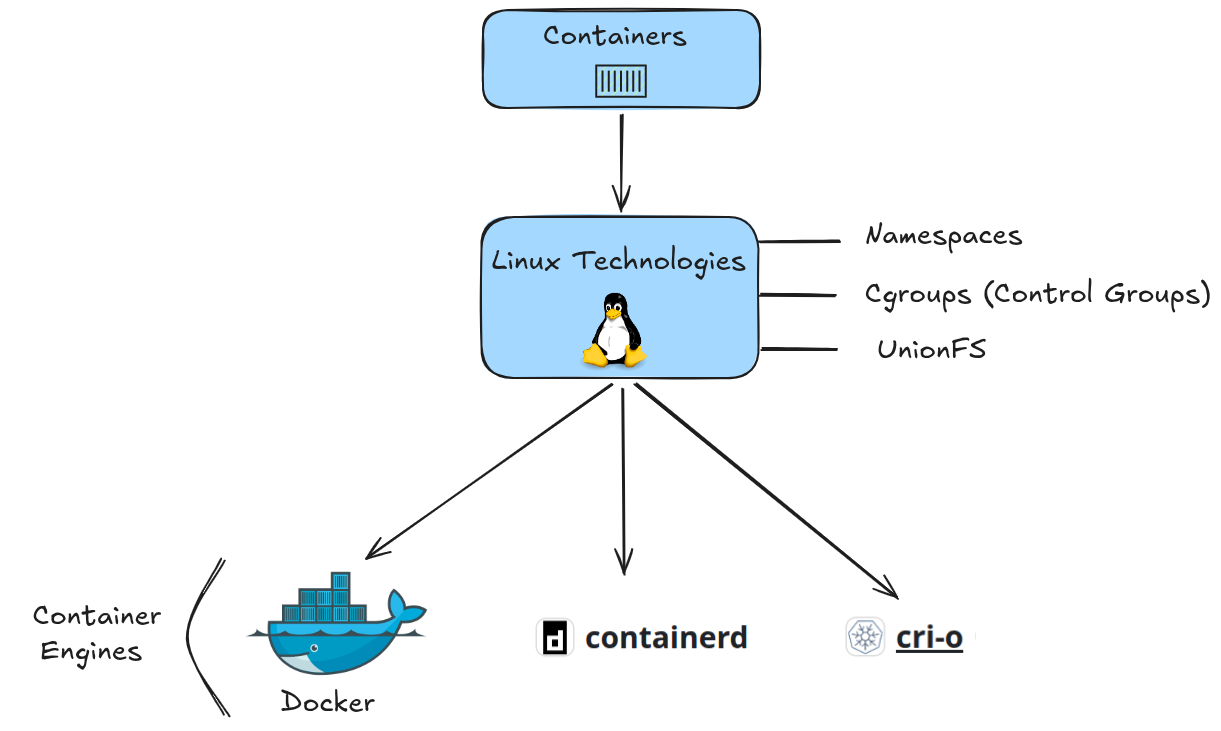
A container is an isolated runtime environment that shares the underlying host operating system while maintaining its own private file system, environment variables and application dependecies.
Advantages:
- Resource Efficiency: By eliminating OS duplication, containers make significantly more efficient use of system resources — typically supporting four to six times the workload density of an equivalent VM-based deployment.
- Portability: Containers encapsulate their own dependencies, ensuring consistent behavior across environments — from a local development machine to a production cloud deployment.
Disadvantages:
- Shared Kernel Vulnerability: Because all containers share the host OS kernel, a kernel-level failure or security vulnerability has the potential to impact all containers running on that host.
- OS Family Dependency: Containers are generally constrained to the OS family of the host system — Linux containers, for instance, typically require a Linux-based host.
When to Use Which?
| Use Case | Best Choice | Why? |
|---|---|---|
| Microservices | Containers | Perfect for small, independent services that need to scale up/down rapidly. |
| Legacy Apps | VMs | Monolithic apps that expect a static environment and specific OS configuration often break in containers. |
| High Security | VMs | If you are running untrusted code (e.g., multi-tenant hosting), VM hardware isolation is safer. |
| DevOps / CI/CD | Containers | Containers can be built, tested, and destroyed in seconds, speeding up pipelines. |
- Use a VM if you need to run an app that requires a specific, full OS or demands high-security isolation.
- Use a Container if you are building modern cloud-native applications (deployed in Kubernetes), need to maximize server efficiency, or require fast deployment speeds.
For more information, see Virtual Machines vs Containers
Practice: Containers vs VMs
💡 PRACTICE
- Install VirtualBox on your machine and try to run Ubuntu VM. Explore how VM is configured.
- Install Docker on your machine and try to run Ubuntu Container.
- ⬆️ Advanced: Install
containerdon Kubernetes Cluster and run pod with Ubuntu container- ⬆️ Advanced: Install
cri-oon Ubuntu VM.- ⬆️ Advanced: Install
cri-oon Kubernetes cluster.
✍️ SOLUTIONS
What is the Containerization Process?
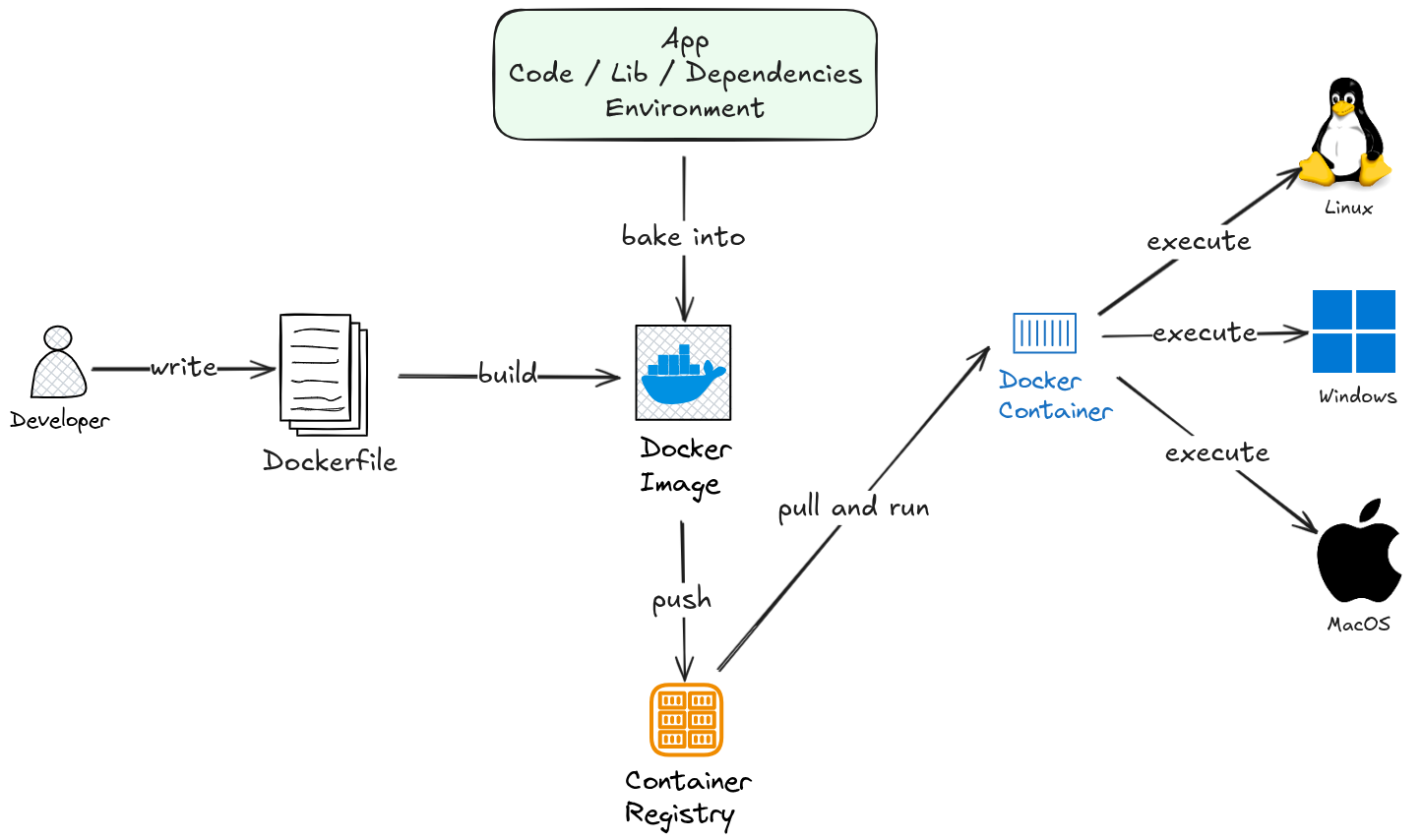
Containerization is the process of packaging an application together with its runtime, libraries, and configuration into a single portable unit — a container image — that can run consistently across any environment.
The goal is simple: eliminate the “it works on my machine” problem by making the environment part of the artifact itself.
From Code to Running Container
The containerization process follows a predictable lifecycle:
1. Write a Dockerfile
A Dockerfile is a plain-text blueprint that describes how to build the image — which base OS layer to start from, what dependencies to install, which files to copy in, and what command to run on startup.
FROM node:20-alpine
WORKDIR /app
COPY package*.json ./
RUN npm install
COPY . .
EXPOSE 3000
CMD ["node", "server.js"]
2. Build the Image
The container runtime reads the Dockerfile and produces a layered, immutable image. Each instruction in the Dockerfile creates a new read-only layer on top of the previous one.
docker build -t my-app:1.0 .
3. Push to a Registry
The image is stored in a container registry — a versioned repository for images. Common registries include Docker Hub, Amazon ECR, Google Artifact Registry, and GitHub Container Registry.
docker push my-registry/my-app:1.0
4. Pull and Run as a Container
Any machine with a container runtime can pull the image and start a container — a live, running instance of that image.
docker run -p 3000:3000 my-registry/my-app:1.0
The Image Layer Model
One of the most important properties of container images is that they are built in layers. Each layer is cached independently.
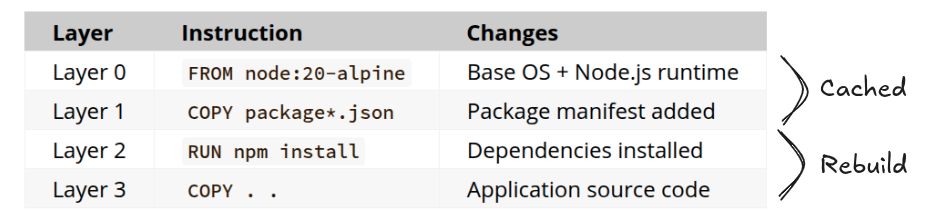
When you rebuild after only changing your application code, Docker reuses the cached layers up to Layer 2 and only rebuilds from Layer 3 onward. This makes builds significantly faster and images smaller.
What Gets Packaged Inside a Container
A container image bundles everything the application needs to run:
- Application code — your source or compiled binary
- Runtime — the language interpreter or execution environment (Node.js, Python, JVM, etc.)
- System libraries —
libc,openssl, and other OS-level dependencies - Configuration — environment variables, config files
- Filesystem layout — directory structure the app expects to exist
What is not included: the Linux kernel. Containers share the host OS kernel — this is what makes them lightweight compared to VMs.
Key Concepts at a Glance
| Concept | Definition |
|---|---|
| Dockerfile | Blueprint for building an image |
| Image | Immutable, layered snapshot of the app and its environment |
| Container | A running instance of an image |
| Registry | Remote storage for images (Docker Hub, ECR, GCR) |
| Container Runtime | Engine that runs containers (containerd, CRI-O, runc) |
| Layer | One instruction’s worth of filesystem changes, cached independently |
Why This Matters for Kubernetes
Kubernetes does not build or run containers directly — it orchestrates them. But every workload running in Kubernetes is ultimately a container image that went through this exact process. When you define a Pod, you reference an image by its registry URL and tag:
spec:
  containers:
    - name: my-app
      image: my-registry/my-app:1.0
Kubernetes pulls that image onto a node, hands it to the container runtime (containerd by default), and starts the container. Understanding the containerization process is therefore foundational — it is the contract between the developer and the cluster.
Practice: Containerization Process
💡 PRACTICE
- Write a
Dockerfilefor a simple web app (any language) and build it withdocker build. For Dockerfile examples, go here.- Run your image locally with
docker runand verify it works.- Push your image to Docker Hub (free account required).
- ⬆️ Advanced: Use multi-stage builds to reduce your final image size.
- ⬆️ Advanced: Use
diveto inspect image layers and identify bloat.- ⬆️ Advanced: Use
hadolintto inspect Dockerfiles for best practices in GitHub CI Actions pipelines.
Can We Containerize the Linux Kernel?
No — and understanding why reveals something fundamental about how containers work.
A container image packages the application and its user space dependencies. The Linux kernel is kernel space — it is never bundled into an image. Instead, every container running on a host shares the same kernel that the host OS provides.
User Space vs. Kernel Space
A Linux system is divided into two distinct layers:
| Layer | What Lives Here | Who Controls It |
|---|---|---|
| Kernel Space | Linux kernel, device drivers, system calls | The host OS — shared by all containers |
| User Space | Libraries (libc), language runtimes, application code | The container image |
When you build a container image, you are packaging only the user space. The kernel is assumed to already exist on whatever host the container runs on.
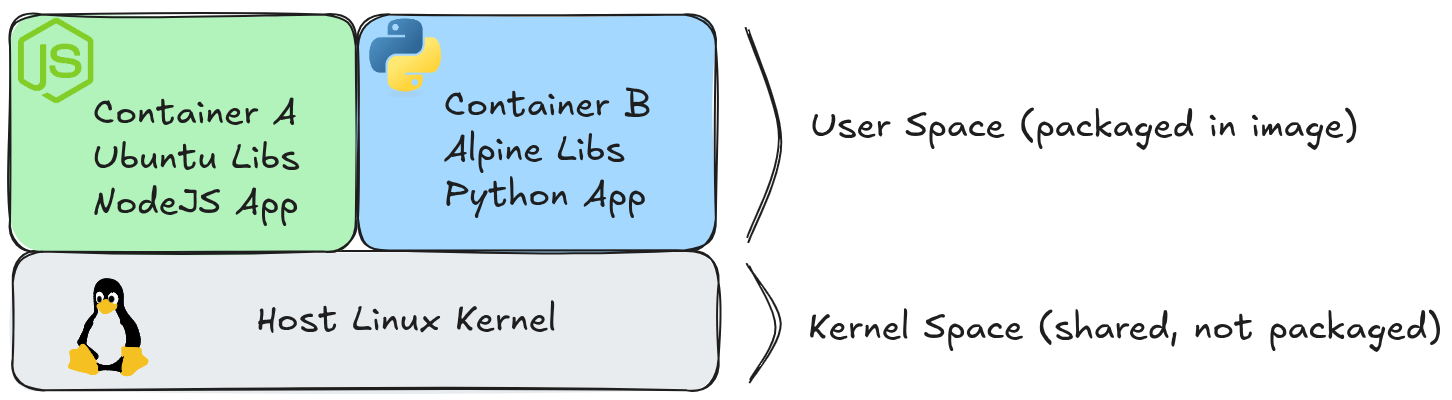
This is why a container image labeled ubuntu does not contain the Ubuntu kernel — it contains only the Ubuntu user space utilities and libraries (apt, bash, libc, etc.).
The Practical Consequence: Kernel Version Dependency
Because containers share the host kernel, they are subject to whatever kernel version the host is running. A container cannot bring its own newer or older kernel.
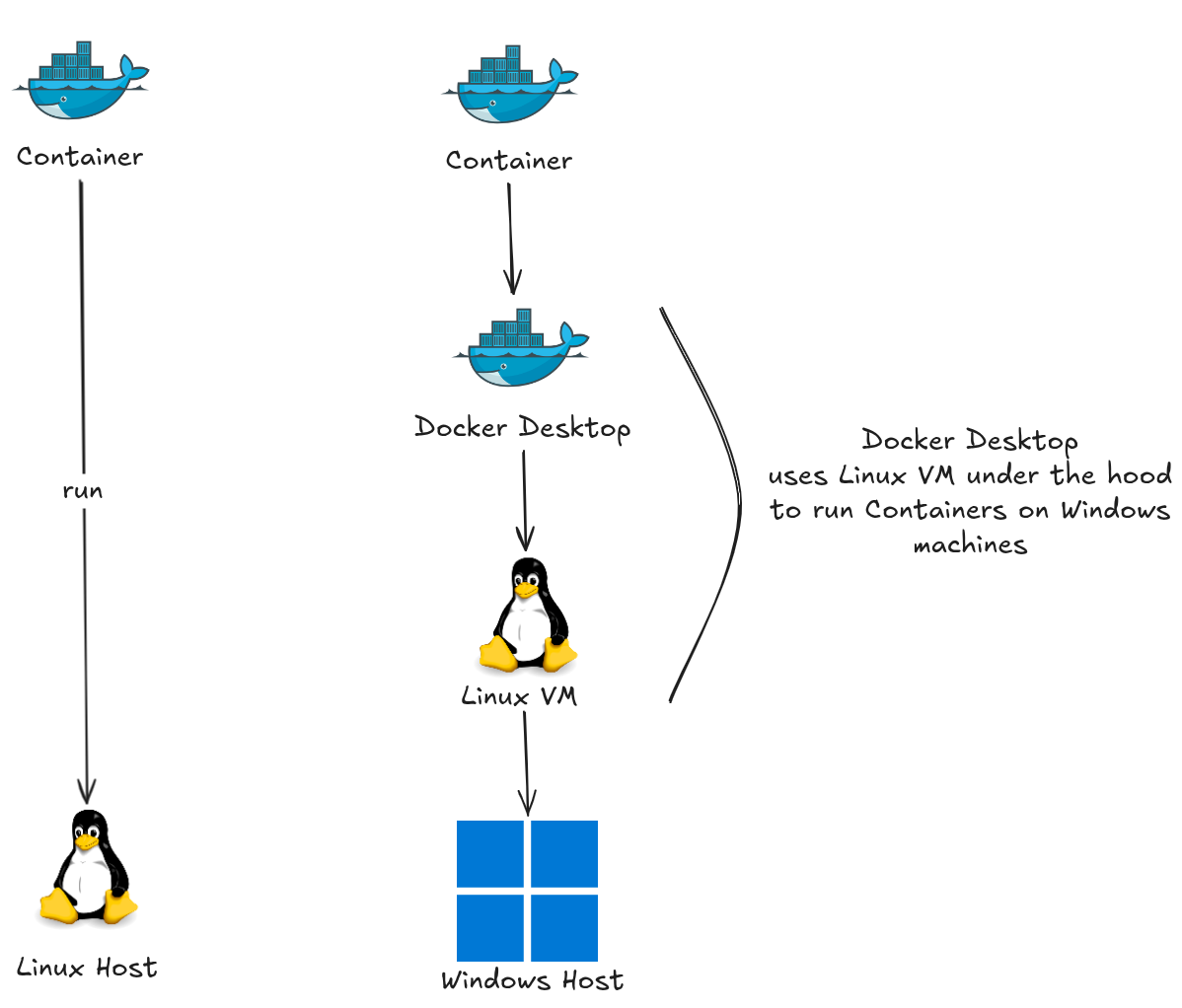
This creates one real constraint: a Linux container requires a Linux host. You cannot run a native Linux container on a Windows host without a Linux VM acting as the intermediary (which is exactly what Docker Desktop does on Windows and macOS — it runs a lightweight Linux VM behind the scenes, and containers share that VM’s kernel).
What About Windows Containers?
Windows containers follow the same principle — they package the Windows user space and share the Windows kernel from the host. A Windows container cannot run on a Linux host, and a Linux container cannot run on a Windows host without the Linux VM layer described above.
Exceptions: Containers That Emulate a Kernel
Two technologies provide container-like packaging while adding a kernel boundary:
gVisor (by Google) — runs a user-space kernel written in Go (runsc runtime). It intercepts system calls from the container and handles them itself, rather than passing them to the host kernel. The container is still an OCI image, but it gets an extra isolation layer. Used in Google Cloud Run.
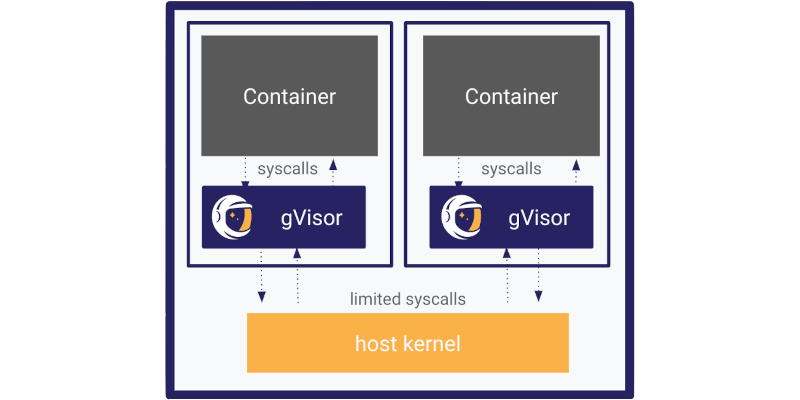 Image source: gvisor.dev
Kata Containers — launches each container inside a lightweight VM with its own kernel. It looks like a container to Kubernetes (same OCI interface) but behaves like a VM from an isolation standpoint.
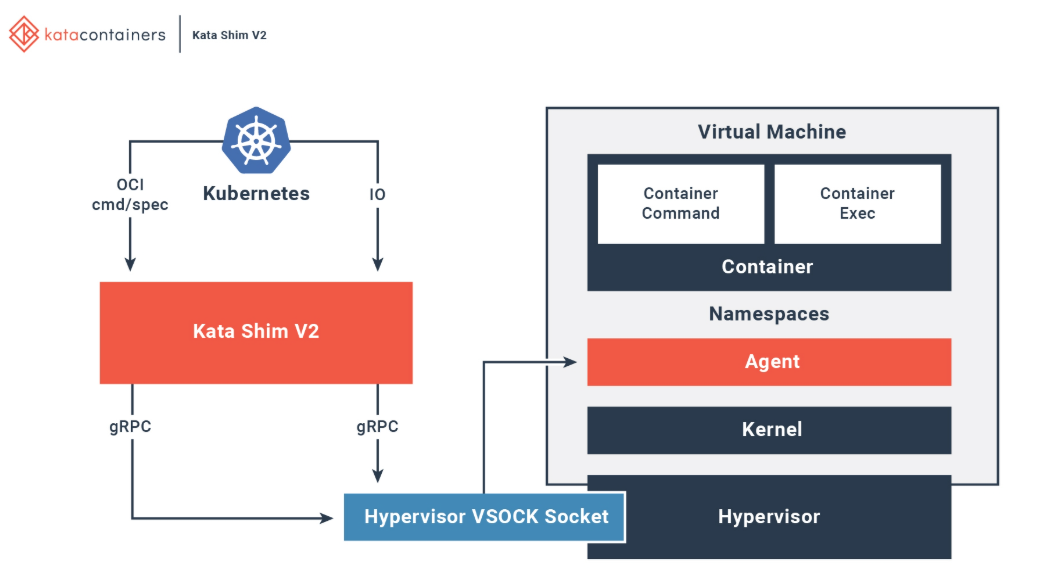 Image source: katacontainers.io
| Technology | Kernel Sharing | Isolation | Overhead |
|---|---|---|---|
Standard container (runc) | Shares host kernel | Process-level | Minimal |
gVisor (runsc) | User-space kernel intercepts syscalls | Syscall-level | Moderate |
| Kata Containers | Own kernel per container (VM) | VM-level | Higher |
These are not mainstream defaults — they exist for workloads that require stronger isolation than standard containers provide (multi-tenant platforms, untrusted code execution).
For more information, see KazHackStan 2025: “Containers Without Right to Escape”.
Why This Matters for Kubernetes
Kubernetes delegates container execution to a container runtime (typically containerd). By default, all pods on a node share that node’s Linux kernel. If you need stronger isolation, Kubernetes supports RuntimeClasses to route specific pods to an alternative runtime like gVisor or Kata Containers:
apiVersion: node.k8s.io/v1
kind: RuntimeClass
metadata:
  name: gvisor
handler: runsc
---
apiVersion: v1
kind: Pod
spec:
  runtimeClassName: gvisor
  containers:
    - name: my-app
      image: my-registry/my-app:1.0
The key insight: the container image format is the same regardless of runtime. What changes is the isolation boundary between the container and the host kernel.
Practice: Kernel Sharing
💡 PRACTICE
- Run
uname -ron your host machine to print the kernel version.- Run
docker run --rm alpine uname -r— observe that the output matches the host kernel, not Alpine’s.- Run
docker run --rm ubuntu uname -r— confirm the same kernel version again, even with a different base image.- ⬆️ Advanced: Install gVisor and run a container with
--runtime=runsc. Compare the syscall behavior withstrace.- ⬆️ Advanced: Configure a
RuntimeClassin a Kubernetes cluster and assign it to a Pod.
✍️ SOLUTIONS
- Solution 4 is here.